Windows Terminal
Instalar Windows Terminal
Instalação do Terminal do Windows
Saiba como instalar e configurar o Terminal do Windows.
https://learn.microsoft.com/pt-br/windows/terminal/install
Configurar temas do Windows Terminal
Esquemas de cores do Terminal do Windows
Saiba como criar esquemas de cores para o Terminal do Windows.
https://learn.microsoft.com/pt-br/windows/terminal/customize-settings/color-schemes
Temas do Windows Terminal
Pegue o tema Monokai Pro no https://windowsterminalthemes.dev/.
Windows Terminal Themes
Browse and copy hundreds of themes for Windows Terminal
https://windowsterminalthemes.dev/
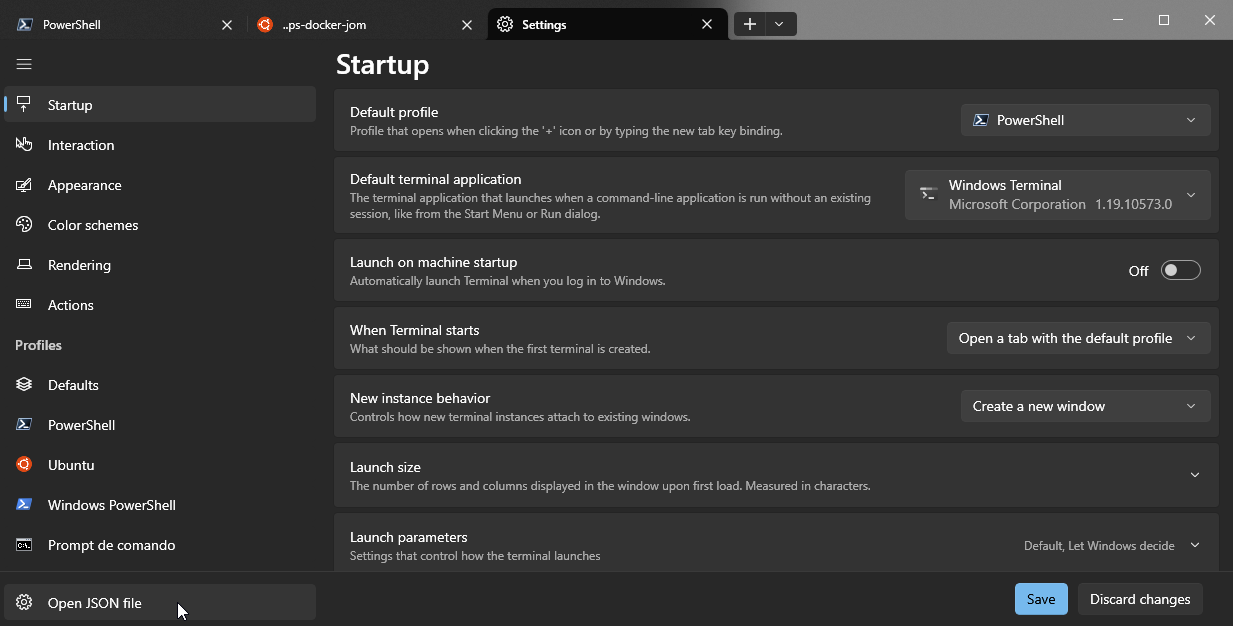
No Windows Terminal, abra o arquivo JSON
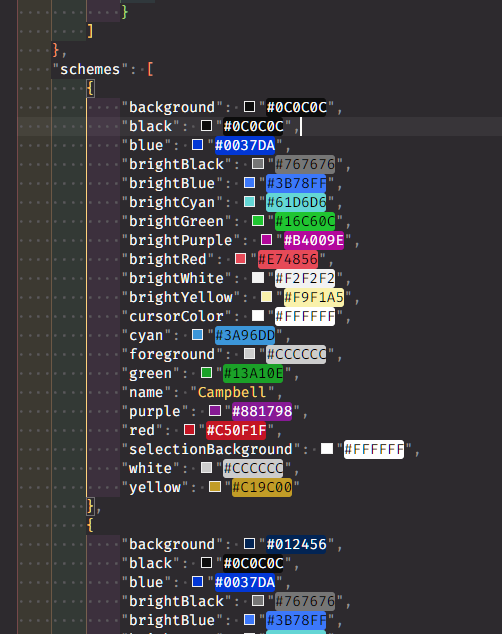
No arquivo de configurações, acrescente o código do tema à lista de schemes.
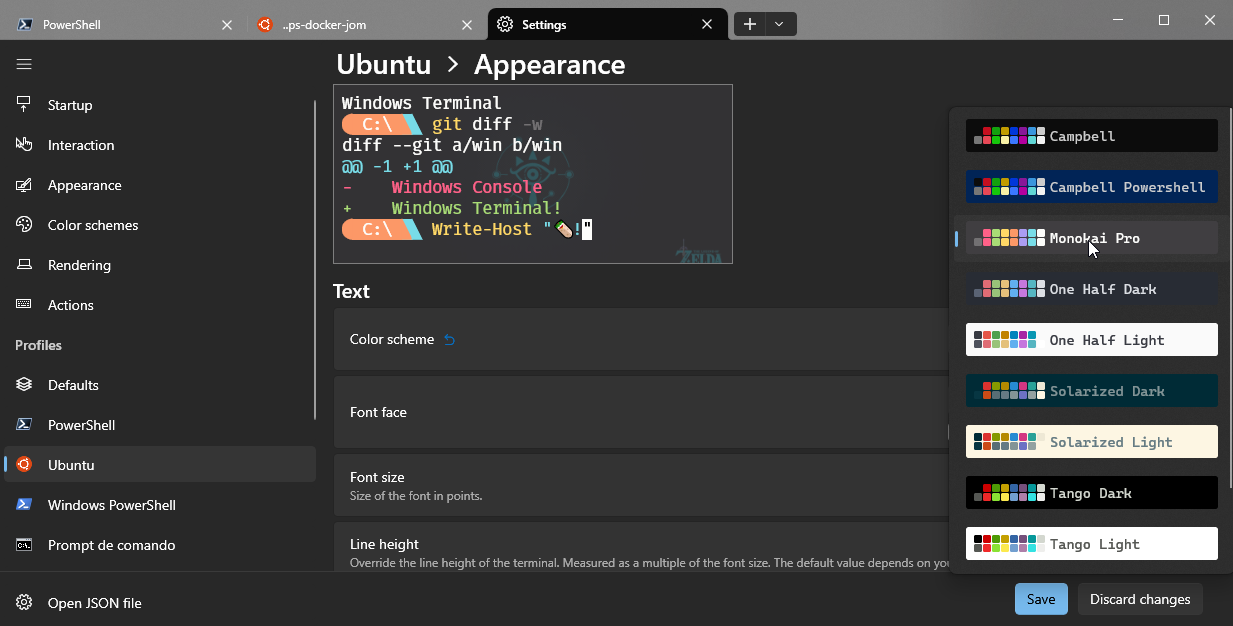
Abra os perfis que quiser e selecione o tema acrescentado.
Instalar WSL, Ubuntu e Docker
Esse guia ensina como:
-
Instalar o WSL2
-
Instalar um Linux, como o Ubuntu
-
Configurar o WSL
https://github.com/codeedu/wsl2-docker-quickstart
https://github.com/josenaldo/wsl2-docker-quickstart
WSL (Windows Subsystem for Linux) - Ultimate Tutorial e últimas novidades
https://www.youtube.com/watch?v=-oxnRGhA9Mg
Melhorando a velocidade da internet do Linux dentro do WSL
Se, dentro do Linux, a instalação de pacotes e os downloads estiverem lentos, execute o procedimento abaixo:
1-Press the Windows Key and type “Control Panel” and hit enter
2- Click “Network and Internet”
3- Click “View network status and tasks”
4- Click “Change adapter settings”
5- Find the “vEthernet (WSL)” adapter and click properties
6- Click “configure” and open the advanced tab
Select “Large Send Offload Version 2 (IPv4)” and change the drop-down to disabled. To the same for “Large Send Offload Version 2 (IPv6)”.
Once this is done click “OK” and you are all done. You may experience a slight downtime in connection while this is saved.
Instalar pacotes básicos
Instale pacotes básicos
sudo apt-get install -y gcc sqlite3Lidando com painéis do Windows Terminal
Painéis do Terminal do Windows
Saiba como dividir painéis no Terminal do Windows.
https://learn.microsoft.com/pt-br/windows/terminal/panes
ZSH
Instalando fontes Fira Code
How to Install Nerd Fonts on Ubuntu - Linuxspin
In this article, you will learn how to install nerd fonts on Ubuntu and applied them to your favorite application like code editor or terminal emulator.
https://linuxspin.com/install-nerd-fonts-on-ubuntu/
Instalar ZSH
Installing ZSH
🙃 A delightful community-driven (with 2,200+ contributors) framework for managing your zsh configuration.
https://github.com/ohmyzsh/ohmyzsh/wiki/Installing-ZSH
sudo apt-get install zshInstalar Oh My ZSH
Home
🙃 A delightful community-driven (with 2,200+ contributors) framework for managing your zsh configuration.
https://github.com/ohmyzsh/ohmyzsh/wiki
Instalar PowerLevel10k
https://github.com/romkatv/powerlevel10k
Instalar plugins do ZSH
Lembre-se de instalar os plugins sempre como plugins do oh-my-zsh.
zsh-autosuggestions
https://github.com/zsh-users/zsh-autosuggestions
git clone https://github.com/zsh-users/zsh-autosuggestions.git $ZSH_CUSTOM/plugins/zsh-autosuggestionszsh-syntax-highlighting
https://github.com/zsh-users/zsh-syntax-highlighting
git clone https://github.com/zsh-users/zsh-syntax-highlighting.git $ZSH_CUSTOM/plugins/zsh-syntax-highlightingzsh-fast-syntax-highlighting
https://github.com/zdharma-continuum/fast-syntax-highlighting
git clone https://github.com/zdharma-continuum/fast-syntax-highlighting.git ${ZSH_CUSTOM:-$HOME/.oh-my-zsh/custom}/plugins/fast-syntax-highlightingzsh-autocomplete
https://github.com/marlonrichert/zsh-autocomplete
git clone --depth 1 -- https://github.com/marlonrichert/zsh-autocomplete.git $ZSH_CUSTOM/plugins/zsh-autocompleteHabilitar plugins
Abra o .zshrc
nvim ~/.zshrcEncontre a linha que contém plugins=(git) e substitua os essa linha por:
plugins=(
        git
        zsh-autosuggestions
        zsh-autocomplete
        fast-syntax-highlighting
        zsh-syntax-highlighting
)
Git
Configurar email e nome do usuário
git config --global user.email "josenaldo@gmail.com"

git config --global user.name "Josenaldo de Oliveira Matos Filho"
Stacks
Node
Instalar NVM
Go
Instalar o Go
Download and install - The Go Programming Language
Don’t see your operating system here?
https://go.dev/doc/install
Configurar Go no ZSH
No arquivo ~/zshrc, atualize o PATH:
export PATH=$PATH:/usr/local/go/binJava
Instale o OpenJDK 17
sudo apt install openjdk-17-jdk openjdk-17-jreEditores
Neovim
Instalar Neovim
sudo apt-get install neovimVS Code
Instalar Code
code .Extensões
-
GraphQL: Language Feature Support: https://marketplace.visualstudio.com/items?itemName=GraphQL.vscode-graphql
-
DotENV: https://marketplace.visualstudio.com/items?itemName=mikestead.dotenv
Pacotes extras
Para trabalhar com gRPC em Go
Instale o protobuf-compiler
sudo apt install -y protobuf-compilerNo arquivo ~/zshrc, atualize o path, de modo a permitir que o protoc encontre os plugins.
export PATH="$PATH:$(go env GOPATH)/bin"- Instale os plugins do
protocol compilerpara Go
go install google.golang.org/protobuf/cmd/protoc-gen-go@latest
go install google.golang.org/grpc/cmd/protoc-gen-go-grpc@latest
Backup
Para fazer backup do Ubuntu, use o comando:
wsl --export Ubuntu c:\wsl-backup\ubuntu.tar